If you’ve ever thought “Squarespace is too expensive for my needs” or wished you could host your site anywhere, you’re not alone. A static export lets you download a Squarespace site to HTML and self-host it for more control, flexibility, and savings. In this guide, you’ll learn exactly how to export your Squarespace website to clean HTML/CSS/JS and deploy it—step by step—using ExFlow, a dedicated Squarespace exporter and downloader.

Why download your Squarespace site to HTML?
- Cost savings: Self-host static files on low-cost or even free providers.
- Speed & security: Static sites are blazing fast and have a minimal attack surface.
- Portability: Your site becomes a portable codebase, easy to back up and move.
- Control: Deploy via Git, S3, FTP, or even host directly with ExFlow.
Quick answer (TL;DR)
- Use ExFlow to export your Squarespace site to static HTML/CSS/JS and media.
- Host on ExFlow, or sync to S3, GitHub Pages/Netlify, or any FTP server.
- Start here: https://exflow.site
What “static export” actually gives you
When you export your Squarespace site to HTML you receive a snapshot of your pages as static files:
- You get: HTML pages, CSS, JavaScript, and images/media.
- You don’t get (natively): Server-side dynamic features such as native search indexing, commerce checkout, memberships, and some form handling. These can be replaced with static-friendly services (more on that below).
- Ideal for: Blogs, portfolios, marketing pages, documentation, landing pages, and content that doesn’t require complex server logic.
Meet ExFlow: A Squarespace exporter built for self-hosting
ExFlow is a focused Squarespace (and Webflow) exporter/downloader that turns your live site into a clean static package you can deploy anywhere. It supports:
- Exporting HTML pages, CSS, JS, and images/media
- Exporting all pages (not just a homepage)
- Pages saved with .html extension
- Optional custom script.js and style.css injection
- Automatic sync to S3, Git, or FTP
- Built-in hosting with unlimited bandwidth and custom domain linking
- Access to password-protected sites when the site owner provides the password
Note: ExFlow offers various plans that unlock higher limits (number of sites, pages per export, export size, sync features, hosting, custom domains) so you can scale as needed.
Step-by-step: Download your Squarespace site to HTML with ExFlow
1) Prep your site
- Audit dynamic features: Note any forms, search, store, or membership areas to replace with static-friendly tools later.
- Clean up content: Fix broken links and update navigation for best results.
- Confirm ownership/access: If the site is password-protected, keep the password ready.
2) Export with ExFlow
- Go to https://exflow.site
- Enter your site’s URL (your live domain or Squarespace staging domain).
- If the site is protected, provide the password (owner-provided) when prompted.
- Configure options:
- Export CSS files
- Export JS files
- Export Images/Media
- Export All Pages (recommended)
- Ensure “Pages use .html extension” is enabled
- Optionally, add custom script.js and style.css to tailor your static build
- Start the export. When it’s done, download the ZIP of your site.
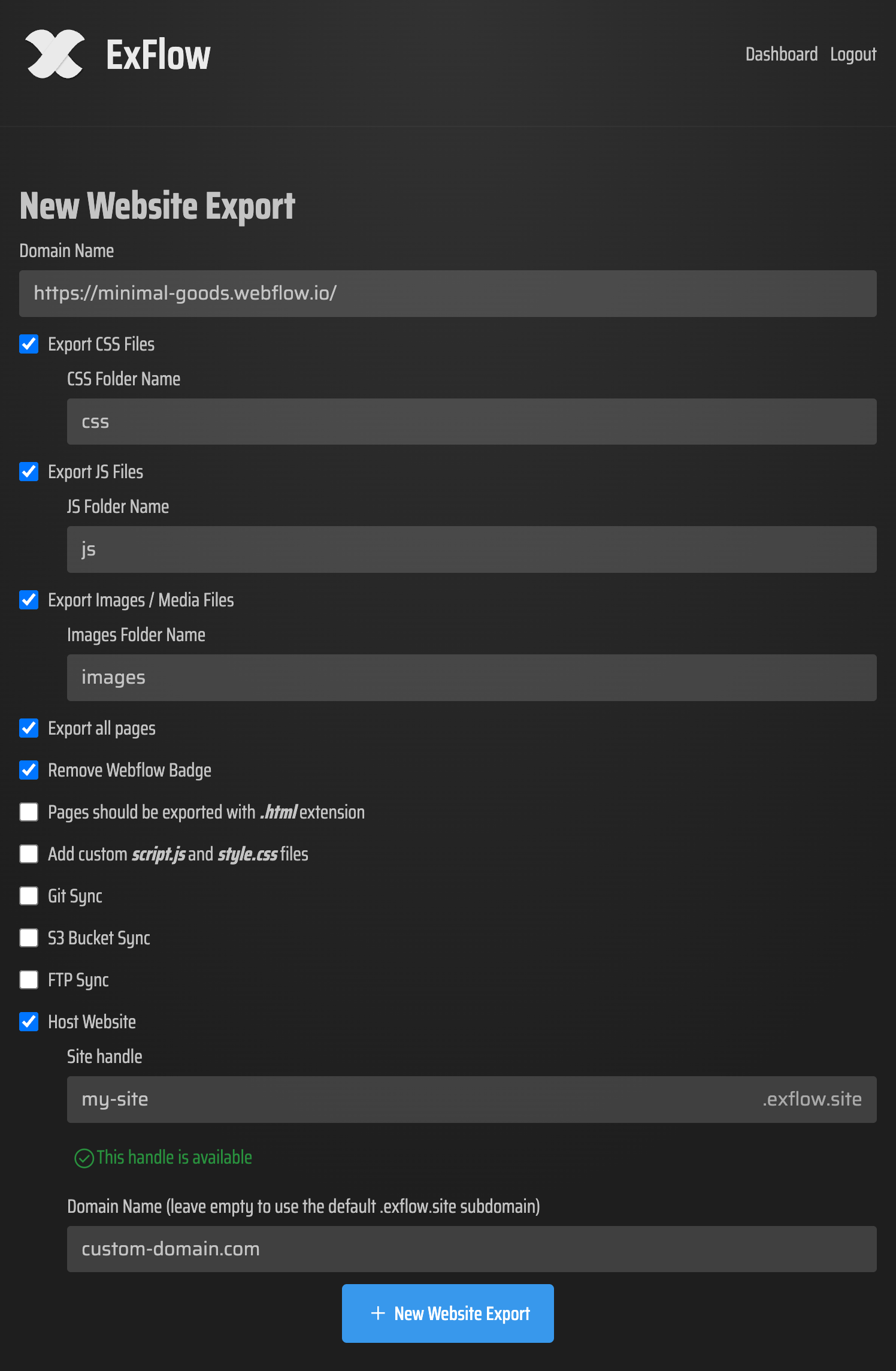
3) Choose a hosting path
You can deploy your static site in minutes using one of these options:
Host on ExFlow (easiest)
Pick hosting during/after export and let ExFlow serve your static site with unlimited bandwidth.
Link a custom domain inside ExFlow for a professional setup.
Sync to Amazon S3 (low-cost & fast)
In ExFlow, enable S3 Sync and enter your S3 credentials.
Create or select a public bucket, enable static website hosting, and set index.html as the default document.
Optionally front with CloudFront for global caching and SSL.
Sync to Git (developer-friendly)
Add your Git repo credentials in ExFlow to push exports automatically.
Deploy via GitHub Pages, Netlify, or Cloudflare Pages.
Enjoy version control, rollbacks, and pull-request previews.
Sync via FTP (classic hosting)
Provide your FTP credentials to upload directly to your server.
Ensure your web root serves index.html by default and supports clean URLs as needed.
Security note: S3, Git, and FTP credentials are sensitive—store and share them securely. ExFlow asks for credentials only to perform the requested sync.
Static replacements for dynamic Squarespace features
- Forms: Use form services like Formspree or Netlify Forms. Replace form actions in your exported HTML accordingly.
- Search: Add a client-side search library (e.g., Lunr.js) and generate an index from your pages.
- Commerce: Link out to a hosted checkout (e.g., Stripe payment links) or embed a lightweight cart solution if needed.
- Comments: Embed a third-party commenting widget that works on static sites.
SEO and performance checklist after exporting
- Canonicals: Ensure each page has a correct rel=canonical tag to prevent duplicate content.
- Redirects: If URLs changed, set 301 redirects via your host (S3 routing rules, Netlify _redirects, or server config).
- Sitemap and robots: Generate a sitemap.xml and robots.txt to guide crawlers. Many static hosts support custom files in root.
- Meta tags & Open Graph: Verify title, description, OG tags, and social image paths.
- HTTPS: Always enable SSL (S3+CloudFront, GitHub Pages, Netlify, Cloudflare, or ExFlow hosting all support HTTPS).
- Image optimization: Compress large images and consider lazy loading for below-the-fold media.
Troubleshooting common issues
- Broken images or CSS: Check that asset paths are relative and that your host preserves directory structure.
- 404 errors: Make sure your host routes to the right index.html for folders and handles trailing slashes consistently.
- JS not executing: Confirm scripts aren’t blocked by CSP/security settings and that they load after the DOM if order matters.
- Forms don’t submit: Update the form action to your new provider, and verify CORS/headers on your host.
- Fonts look different: Ensure custom fonts are exported and paths in CSS are correct.
When self-hosting is a great Squarespace alternative
- Budgets are tight and hosting flexibility matters.
- Your content is mostly static (portfolio, blog, docs, marketing pages).
- You want Git-powered workflows, PR previews, and easy rollbacks.
- You value ownership and portability of your site’s code.
When to stay on Squarespace
- You rely heavily on native commerce, memberships, scheduling, or authenticated areas.
- You want an all-in-one ecosystem without handling deployments or third-party services.
Why ExFlow for Squarespace to HTML
- Purpose-built Squarespace exporter/downloader with simple setup.
- Export all pages, assets, and scripts in one clean package.
- Optional hosting with unlimited bandwidth—or sync to S3, Git, or FTP.
- Scales with your needs via flexible plans.
Get started today
Take control of your site and hosting costs. Export your Squarespace site to HTML with ExFlow and deploy in minutes. Whether you choose ExFlow Hosting or sync to S3, GitHub Pages/Netlify, or your own server via FTP, you’ll have a fast, portable, and budget-friendly website you truly own.
Comments
Post a Comment