If you love designing in Framer but want more control over hosting—or you simply feel Framer is too expensive for long-term hosting—self-hosting your site is a smart move. The biggest worry? Breaking those silky-smooth interactions, animations, page transitions, and scroll effects. In this guide, you’ll learn a safe, reliable way to go from Framer to HTML and self-host without sacrificing interactivity.
Why interactions break when you “just download” a site
- Many site cloners miss critical JavaScript bundles, dynamic data attributes, or initialization order. Interactions depend on exact script loading, asset paths, and DOM structure.
- Minification or HTML rewriting on some hosts can reorder scripts or strip attributes.
- Missing fonts, incorrect CORS headers, or CSP rules can silently block assets.
- Dynamic components (search, memberships, gated content, CMS) don’t export 1:1 in static form.
The safer path: use a purpose-built Framer Exporter The best way to Self-host a Framer site—without breaking interactions—is to export an accurate static build (HTML, CSS, JS, images, and all pages) and host it on a performant CDN. That’s exactly what ExFlow provides.
ExFlow is a Framer Exporter, Framer Downloader, and deployment pipeline in one. It lets you Download a Framer Site by URL, automatically preserve interactions, and push your export straight to hosting. You can even remove the “Made with” badge and add your own script/style files for polish.
Key capabilities at a glance
- Export to static: HTML pages, CSS, JS, images/media
- Export all pages (keep structure and interactions intact)
- Remove “Made with” badge
- Add custom script.js and style.css
- Sync to Git, S3, FTP
- Optional hosting with unlimited bandwidth and custom domain linking
- Plans with different limits (exports, sites, bundle size, pages)
Explore it here: https://exflow.site
Step-by-step: Framer to HTML (without breaking interactions) 1) Map what’s interactive vs. dynamic
- List your critical interactions (hover, tap, scroll, parallax, page transitions, modals).
- Identify dynamic features (search, memberships, gated content). Dynamic features may need third-party replacements when self-hosted.
2) Export with ExFlow
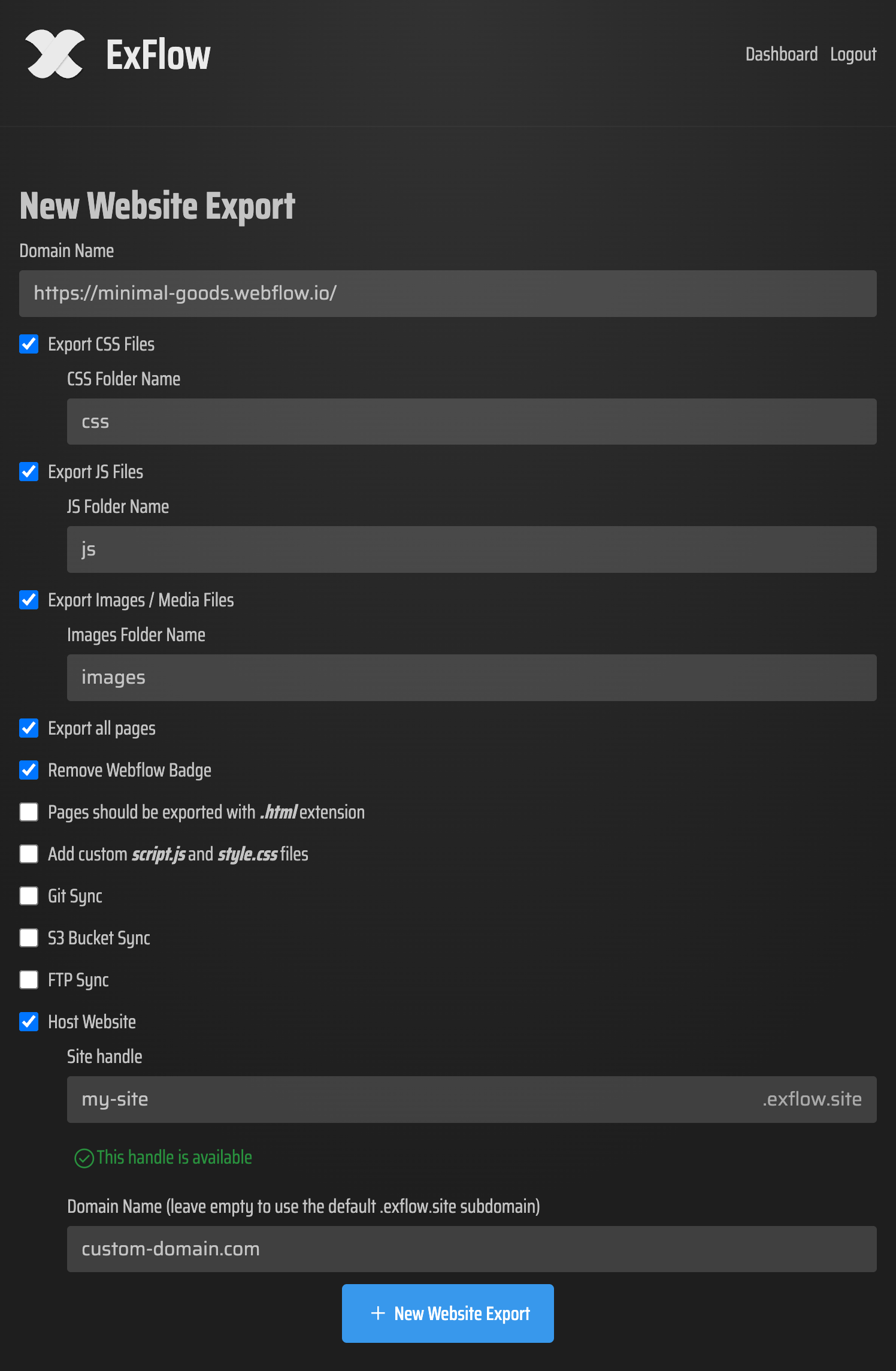
- Go to https://exflow.site and paste your live Framer URL.
- Enable: Export CSS Files, Export JS Files, Export Images / Media Files, Export All Pages.
- Optional: Remove “Made with” badge, Add custom script.js/style.css.
- Keep pages with .html extensions.
- If needed, set up Git, S3, or FTP sync; otherwise, just download the ZIP. ExFlow offers plans with higher limits; choose what fits your project.
3) Choose your hosting workflow You have several reliable options for self-hosting a Framer site:
- Host on ExFlow: Easiest route—toggle Hosting during export and link a custom domain. Unlimited bandwidth keeps interactions smooth.
- Amazon S3 + CDN: Use ExFlow’s S3 sync. Enable static website hosting on the bucket, set index.html, and front it with a CDN (e.g., CloudFront) for speed.
- Git-based deploys (GitHub Pages/Netlify): Use Git Sync in ExFlow to push your export to a repo. Connect that repo to your preferred static host.
- Traditional web server (FTP): Provide FTP credentials in ExFlow and deploy directly to your server.
4) Preserve script integrity and asset paths
- Do not reorder or strip scripts. Avoid host features that “optimize” or combine JS/CSS unless you can control order.
- Use relative paths for internal assets; ensure fonts/images/JS load over HTTPS.
- Avoid injecting site-wide wrappers that alter the DOM structure.
5) Finalize domain, HTTPS, and caching
- Add your custom domain, enable HTTPS, and set cache headers with sensible TTLs. Stale JS can break interactions—use versioned filenames or ETags.
Hosting options in detail
ExFlow Hosting
One-click: Choose Hosting when exporting.
Unlimited bandwidth and custom domain linking.
Minimal setup and maximum reliability for animations and interactions.
Amazon S3
Sync files via ExFlow’s S3 integration.
Enable static website hosting, set index.html, and configure error documents (404.html).
Add CDN caching for global performance and smooth animation playback.
Git + static hosts (e.g., GitHub Pages, Netlify)
Push the exported site with ExFlow’s Git Sync.
Ensure the host doesn’t auto-transform HTML/JS. Disable aggressive bundling.
Set correct publish directory (root of the export) and verify 404 handling.
FTP to your server
Provide FTP credentials in ExFlow, deploy to public_html.
Confirm correct permissions and MIME types (.js, .css, .woff2, .mp4, etc.).
Troubleshooting: keep interactions crisp
Script order
If transitions or scroll effects fail, a dependency may be loading late. Remove async/defer from critical bundles if your host injects them.
Content Security Policy (CSP)
Whitelist your own domain for scripts/styles and any third-party endpoints (analytics, forms). An overstrict CSP silently kills JS.
CORS & fonts
Serve fonts with correct CORS headers (Access-Control-Allow-Origin: * or your domain). Missing fonts can impact layout and timing of animations.
Pathing & base href
Avoid a
tag that unintentionally rewrites relative links. Stick to root-relative or carefully tested relative paths. HTML “optimizers”
Turn off HTML/JS minifiers that reorder attributes or inline scripts. They can break initialization logic.
Third-party scripts
Check analytics, chat widgets, or A/B testing scripts. Heavy scripts can block main thread—defer them or lazy-load after primary interactions are ready.
What won’t export 1:1
- Account systems, gated content, or membership features.
- Dynamic search or server-rendered content.
- Forms that rely on platform-native backends. Use a third-party form handler or serverless function instead.
Practical QA checklist
- Interaction pass: Hovers, taps, scroll-based animations, and page transitions behave as designed.
- Visual pass: Fonts, gradients, and effects match the original. No FOUT/FOIT.
- Link pass: Internal links, anchors, and external links all resolve (including deep links).
- Performance pass: LCP under 2.5s on mobile; JS bundles cached; images optimized.
- SEO pass: Titles, meta, Open Graph, canonical tags, sitemap.xml and robots.txt present.
- 404 & redirects: Friendly 404 page; essential 301s configured after domain move.
Why teams choose this route
- Save on hosting if Framer is too expensive for your use case.
- Keep the design workflow you love while gaining control of infrastructure.
- Use ExFlow as your Framer Alternative for deployment: Export, optimize, and ship to your stack with confidence.
Get started now
- Try ExFlow: https://exflow.site
- Configure Export All Pages, CSS/JS/Images, and add your custom script/style if needed.
- Pick Hosting on ExFlow or sync to S3/Git/FTP and go live.
Video walkthroughs (conceptually similar flow)
- How to Export a Webflow Site For Free (process mirrors the idea of exporting and self-hosting): https://www.youtube.com/watch?v=QFuDqtk09qs
A quick note on rights and terms Only export and host sites you own or have explicit rights to. Always review the platform’s terms and applicable laws before exporting.
Bottom line If you want to Self-host a Framer site without breaking interactions, the reliable workflow is: export accurately, preserve script order and assets, choose a stable host, and test with intent. ExFlow streamlines this from Framer to HTML—letting you Download a Framer Site, keep the magic of your interactions, and host it anywhere you like. Ready to ship? Start here: https://exflow.site
Comments
Post a Comment