
If you need to generate videos from data, you eventually hit the same bottleneck: the project is easy to describe, but painful to render repeatedly. Templates drift, edits break timing, and moving the same asset through a browser, a server, and a preview tool usually means rewriting the workflow three times.
VideoFlow is built for that problem. It lets you describe a video as portable JSON, author scenes with a fluent TypeScript API, and render the same project in different environments without rebuilding your composition logic. That makes it a strong fit for product demos, social clips, onboarding videos, report generation, and AI-driven video workflows.
In this article, you’ll see how to use VideoFlow as the backbone of a browser-based MP4 export pipeline, when to keep rendering in the browser, and when to move the same JSON project to a server.
Why JSON First Matters
Traditional video tooling often mixes three concerns:
- authoring the scene
- rendering the final asset
- editing or previewing the project
That works until you need repeatability. The moment your input becomes dynamic, JSON becomes the useful interface. A JSON representation is easy to store, diff, version, generate, and hand to another service later.
VideoFlow’s core idea is simple: define the video in code, compile it into portable VideoJSON, and then render that same source of truth wherever you need it. That means the same project can power a live preview, a browser export, and a headless render job.
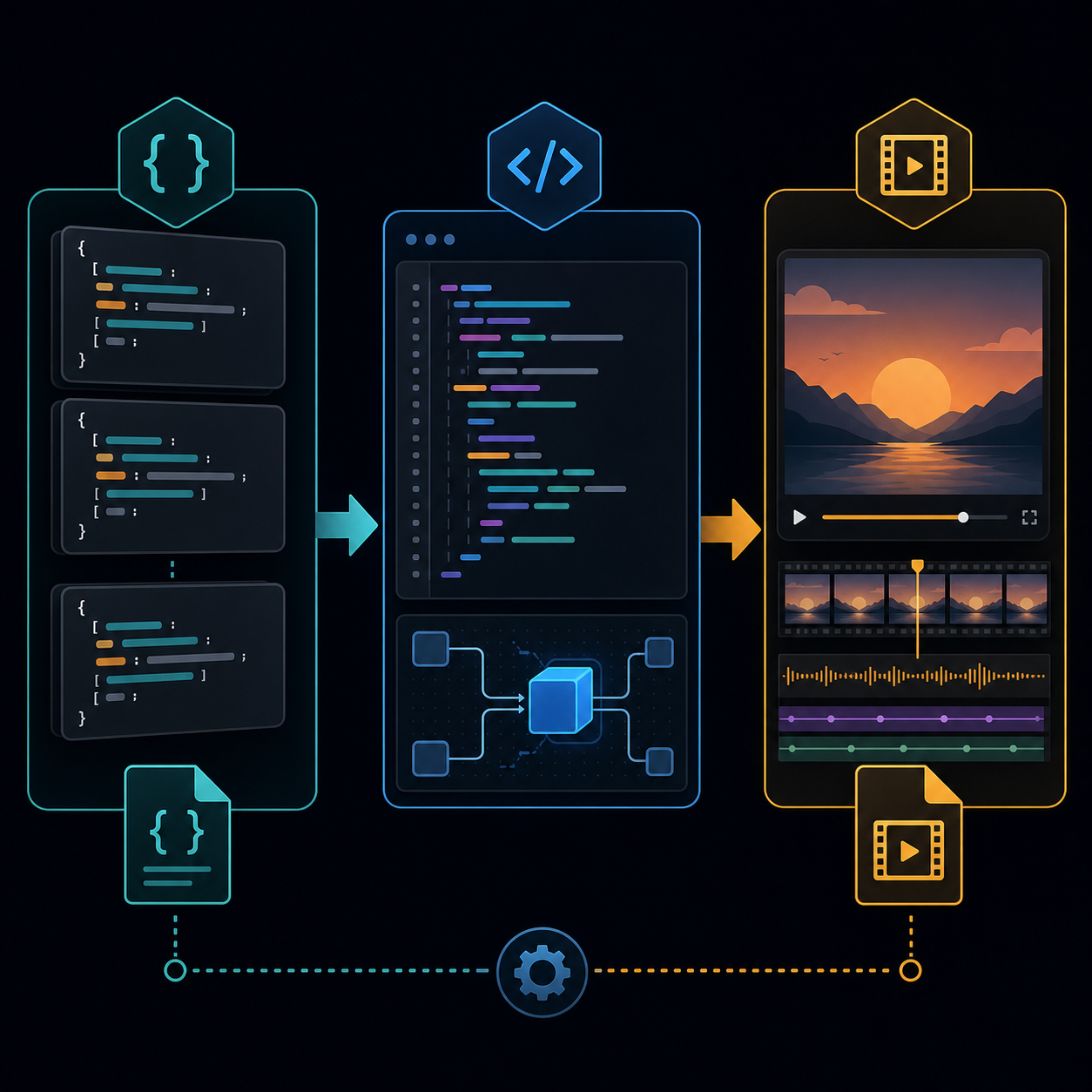
For developer tools, that separation is important. Your app can own the composition rules while the renderer stays replaceable. That is a cleaner architecture than building render logic directly into your UI.
Start With the Core Builder
The @videoflow/core package is the authoring layer. It gives you a fluent TypeScript API for building scenes with text, image, video, audio, captions, and shape layers. You can sequence actions, branch in parallel, and compile the result into VideoJSON.
A simple flow looks like this:
import VideoFlow from '@videoflow/core';

const $ = new VideoFlow({
  name: 'Promo Clip',
  width: 1920,
  height: 1080,
  fps: 30,
});

$.addText(
  { text: 'Launch faster', fontSize: 7, fontWeight: 800 },
  { transitionIn: { transition: 'overshootPop', duration: '500ms' } }
);

const json = await $.compile();
That flow gives you a few practical advantages:
- the project is code, not a manual timeline
- the composition can be generated from product data or AI output
- the compiled JSON becomes a reusable artifact
- the same source can power multiple renderers later
If you are building a product where users create many similar videos, that portability is the whole point. You can create templates once, then parameterize them with customer, catalog, campaign, or analytics data.
Render in the Browser When You Can
Browser rendering is the cleanest option when the user expects immediate feedback. It avoids a server round-trip, keeps export logic close to the UI, and is useful for lightweight or low-cost workflows.
VideoFlow’s browser renderer can export MP4 directly in the browser. That is especially useful for:
- in-app export buttons
- creator tools with local-first workflows
- internal dashboards that need quick renders
- demos where you want the whole pipeline in one place

A browser-first pipeline is not only about convenience. It can also reduce infrastructure complexity for teams that do not want to stand up a rendering queue for every job. If the project fits comfortably in the browser, the user gets a faster loop and your backend stays out of the critical path.
That said, browser rendering is not always the best answer. Large projects, queued jobs, batch rendering, and scheduled exports usually belong on the server.
Move the Same Project to the Server
The useful part of VideoFlow is that you do not have to rewrite the composition just because the execution environment changes. The same VideoJSON can render in Node.js on a server, which gives you a natural path from prototype to production.
Server rendering is a better fit when you need:
- high-volume batch jobs
- asynchronous export queues
- scheduled renders
- longer or heavier compositions
- API-driven generation from external systems
This is where structured video becomes valuable for automation teams. A CRM trigger, ecommerce event, analytics report, or AI agent can generate data, hand off the JSON, and let the renderer finish the job.
If you are already thinking in terms of product workflows, this is also where VideoFlow pairs well with broader site automation. For example, if your app also exports site assets or landing page content, the same kind of JSON-first thinking applies. A related example is How to Export a Webflow Site to Static HTML with ExFlow, which shows how repeatable export logic can be packaged for developers.
Let AI Agents Produce Structured Video
Another strong use case is agentic video generation. Instead of asking an AI model to manipulate a timeline directly, you can ask it to generate structured video data or TypeScript that matches your template rules.

That approach is easier to validate. You can inspect the JSON, reject invalid scene definitions, and keep the renderer deterministic. For teams building internal copilots or content automation tools, that predictability matters more than flashy generation.
A good pattern is:
- define a reusable template in TypeScript
- let the model fill in structured fields
- compile to VideoJSON
- render in the browser or on the server
That keeps the AI in the role it handles well: generating structured input. It keeps the rendering stack doing the job it handles well: turning a deterministic project into an MP4.
For a deeper walkthrough of the data-to-video flow, see How to Generate MP4 Videos from JSON with TypeScript. That article focuses on the build step itself, while this one focuses on the export pipeline around it.
Where the React Editor Fits
VideoFlow also includes a React video editor component. That matters if your product needs both code-generated templates and a visual editing layer for users who want to tweak scenes without writing code.
A practical architecture is:
- use
@videoflow/corefor the template source of truth - use the DOM renderer for live preview
- use the React editor for layer manipulation and inspection
- use the browser or server renderer for export
That gives you a complete product surface without fragmenting the project model.
When to Use VideoFlow
VideoFlow is a strong fit if you are building:
- programmatic marketing videos
- templated social clips
- AI video workflows
- embedded video editors
- server-side batch export systems
- browser-based MP4 export tools
It is less useful if your team only needs one-off manual editing. In that case, a traditional nonlinear editor is still the better tool. VideoFlow is for repeatable, code-driven, data-driven video systems.
Conclusion
If your video workflow needs to be repeatable, portable, and automatable, JSON is a better source of truth than a manual timeline. VideoFlow turns that idea into a practical stack: TypeScript for authoring, VideoJSON for portability, and multiple renderers for browser, server, and preview use cases.
Start with the core builder, compile to portable JSON, and choose the renderer that matches the job. If you are building a product that needs scalable video generation, that pattern will save you from rewriting the pipeline every time the output channel changes.
Comments
Post a Comment