Boost Your Etsy Sales With Instagram Shop Integration
In today's digital age, having a presence on social media is not just an option but a necessity, especially for small business owners. Etsy sellers looking to expand their reach and increase sales would benefit significantly from integrating their listings with Instagram Shop. This process allows you to tag your products directly in Instagram posts, making it easy for customers to move from browsing to purchasing seamlessly.
Why Sync Etsy Listings with Instagram?
Linking your Etsy listings with Instagram Shop is one of the most effective ways to drive traffic and increase engagement. Instagram, with its visually-driven platform, is perfect for showcasing your products in a lifestyle context. Here are some of the benefits:
- Enhanced Visibility: Display your products to a larger audience who are already active on Instagram.
- Increased Traffic: Direct links in your posts help seamlessly drive traffic to your Etsy store.
- Improved Conversion Rates: Easier access for potential customers leads to better conversion rates.
The Tool You Need: Catalog Generator for Etsy
To simplify this integration process, using the Catalog Generator app for Etsy is highly recommended. It automates the linking of your Etsy shop with Facebook and Instagram by generating a catalog that keeps your listings synced. Here’s why you should consider it:
- Automatic Updates: No need for manual listings updates as changes sync automatically.
- Ease of Use: Simple setup with all instructions provided.
- Affordability: Priced at only $5/month with a 7-day free trial.

Step-by-Step Guide to Set Up the Integration
1. Create a Facebook Business Account
Start by visiting business.facebook.com to create a Facebook business account. Ensure your Instagram account and Facebook page are linked to your new business account.
2. Verify Your Domain Name
Visit the 'Business Settings' section, navigate to the 'Domains' tab under 'Brand Safety,' and add your domain name. This verification step confirms your shop's ownership.
3. Link Catalog Generator to Etsy
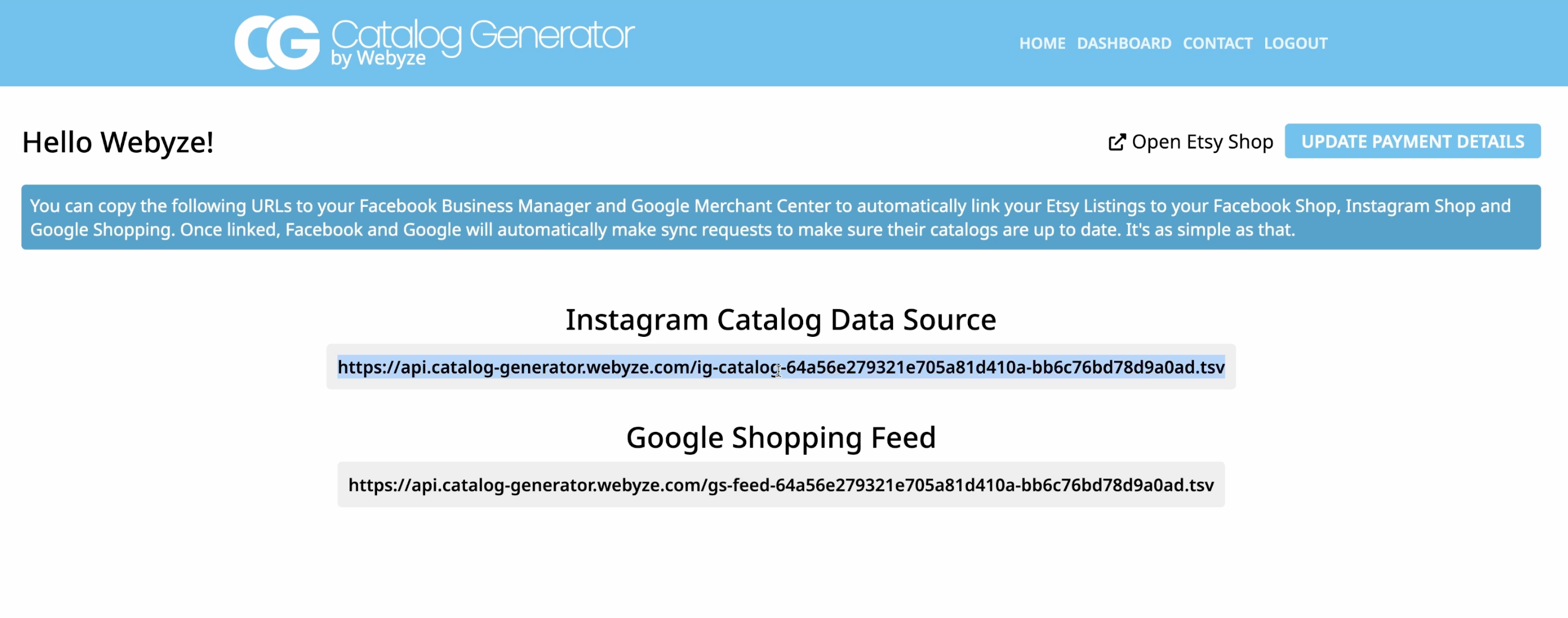
Visit the Catalog Generator page and log in. If you don't have an account, you can sign up. Connect your Etsy shop to access your listings.
4. Set Up Data Feed in Commerce Manager
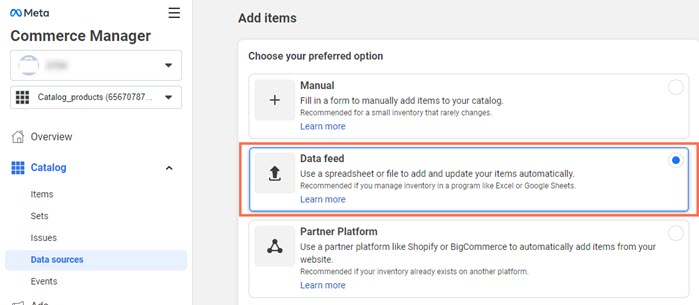
Go to 'Commerce Manager' via your Facebook account, and choose to add items via a data feed. Instead of uploading a file, use the data feed URL from Catalog Generator. Specify the synchronization schedule—daily is recommended.
5. Submit Your Domain for Approval
Ensure your domain is approved to begin tagging products in Instagram stories and posts. This setup offers a substantial boost to your marketing efforts and engagement.
Optimizing Your Instagram Shop Strategy
- Content Creation: Capture high-quality images and videos that hold audience attention.
- Hashtag Strategy: Use relevant hashtags to increase the visibility of your posts.
- Consistency and Engagement: Regularly post and engage with your audience to build relationships and trust.

Conclusion
Integrating your Etsy listings with Instagram Shop through the Catalog Generator app is a game-changer for any seller looking to expand their business. The process is straightforward, efficient, and above all, highly beneficial for driving sales and engagement. Try the Catalog Generator today with their free trial offer and start seeing the difference in your business traffic and conversions.
For further assistance or queries during the setup process, feel free to reach out to the support team. Remember, the digital world is evolving, and with the right tools, your Etsy shop can reach new heights!
Comments
Post a Comment