Introduction
In today's fast-paced digital environment, content creators are on an endless quest to enhance productivity without sacrificing quality. If you're leveraging Notion for organizing your thoughts and Webflow for dazzling design, there's one tool that effortlessly bridges the gap: SyncFlow. This article is your comprehensive guide to streamlining the blogging process with Notion and Webflow, ensuring you can write, sync, and publish faster than ever.
Benefits of Using Notion and Webflow
Notion is a powerhouse for organizing, writing, and collaborating on content. Its flexibility allows you to structure your ideas visually and connect related concepts intuitively. Meanwhile, Webflow provides a designer-centric platform that combines the power of code with the simplicity of a visual editor, allowing seamless publication of beautiful and responsive websites.
Unlocking New Levels of Efficiency with SyncFlow
- Automatic Synchronization: Cut down on manual work with automatic syncing of content from Notion to Webflow.
- Flexible Customization: Choose between inline styles or using classes to ensure your content looks just the way you want.
- Real-Time Updates: Opt for auto-publish to ensure your site is always up-to-date with the latest content.
Step-by-Step Guide to Syncing with SyncFlow
Here’s a streamlined path to writing and publishing faster:
1. Prepare Your Accounts
- Visit SyncFlow's Website and click 'Get Started'. Ensure your Notion and Webflow accounts are ready for integration.
- Grant Access to Connect SyncFlow with your Webflow sites.
2. Setting Up SyncFlow
- Install: Integrate SyncFlow by launching it from the Webflow designer.
- Connect Notion: In the app, choose the specific Notion page you want to synchronize.
3. Configure and Sync
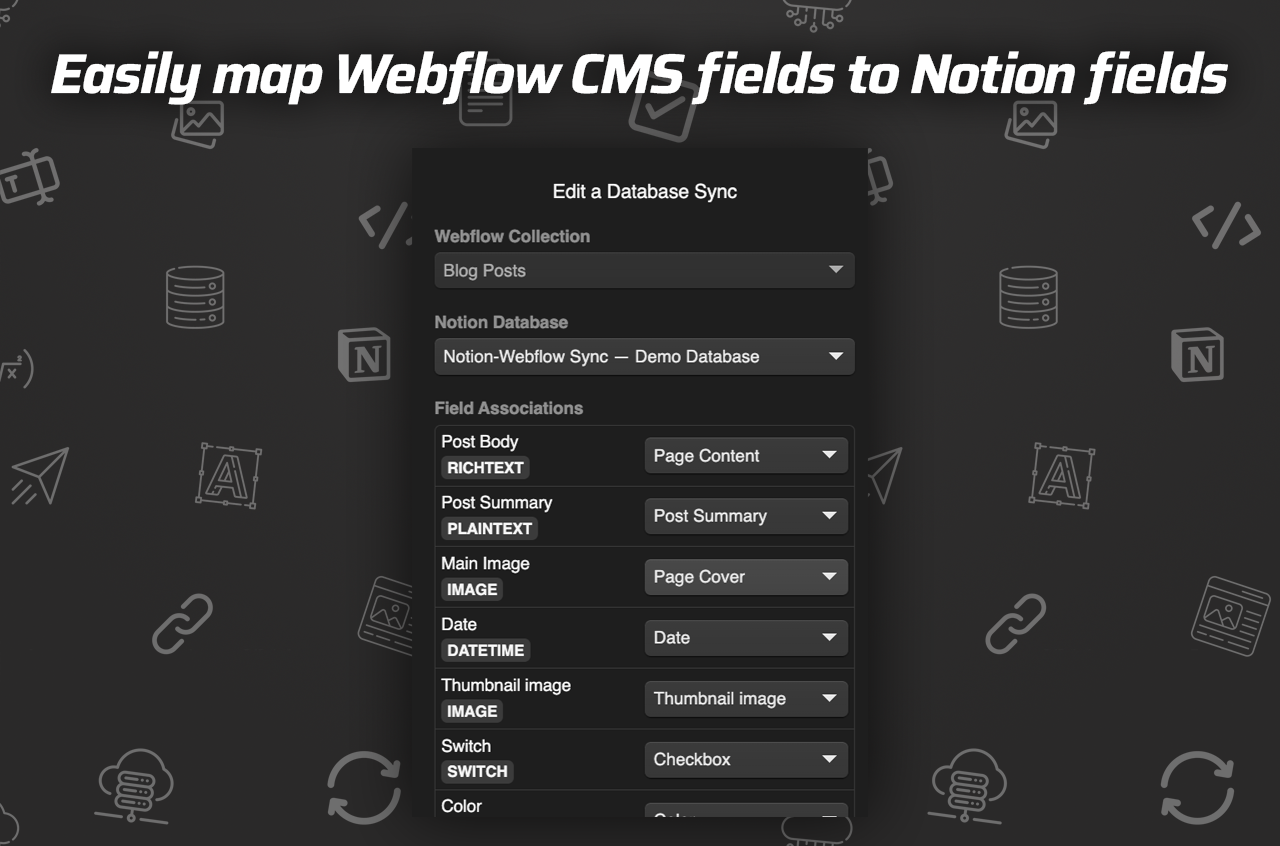
- Map Fields: Set Notion database fields to match your Webflow CMS Collection.
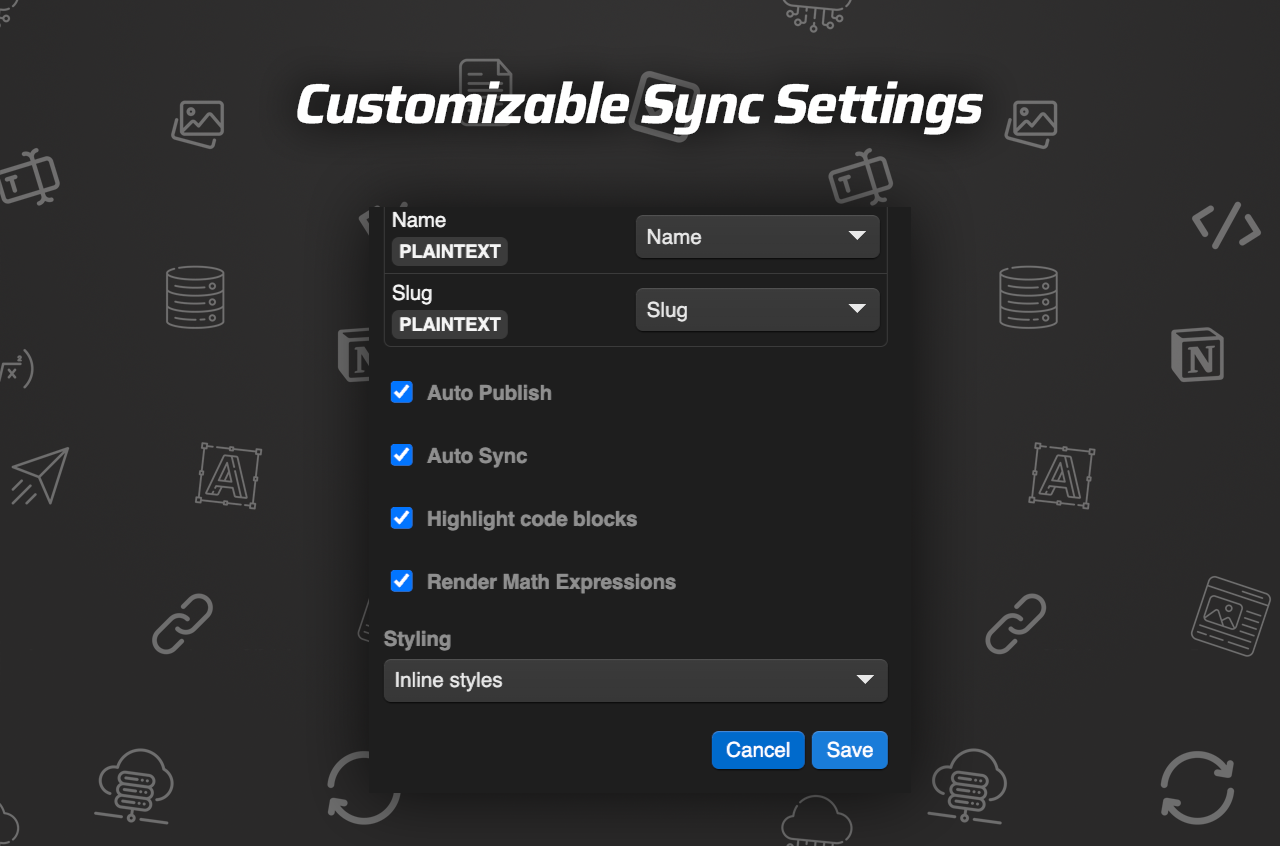
- Adjust Settings: Configure 'Auto-Sync', 'Auto-Publish', and other parameters for optimal performance.
- Choose Styling Options: Decide between ‘Inline Styles’ or ‘Use Classes’ for customization.
- Save and Verify: Make a test entry in Notion, then verify it within the Webflow CMS Collection.
Watch the Full Tutorial to see each step in action.
Streamlining Content Management with SyncFlow
SyncFlow allows you to focus on what really matters—content creation—by handling all the heavy lifting related to CMS synchronization. With features like automatic publishing and versatile field type support, your Webflow site is as dynamic as your creativity.

Why SyncFlow is the Future of Content Workflow
Using SyncFlow, you gain precise control over your website’s design and how content is showcased. Its capability to highlight code blocks and render mathematical expressions makes it ideal for technical authors as well as creative bloggers.
Pricing
Wondering about the investment? SyncFlow offers a Standard Plan at only $8/month, including:
- Unlimited Syncs and Databases
- Unlimited Connected Fields
- 1 Webflow Site Install
Get started with these tools to not only improve your workflow but also ensure you're steadily building a compelling and cohesive online presence.
Conclusion
Using Notion and Webflow together with SyncFlow redefines blogging efficiency. You’re no longer starting from scratch every time you move from idea to publication. Get started with SyncFlow today, and watch your productivity flourish.
Optimize your blog delivery pipeline with SyncFlow and revolutionize how you create and publish content effortlessly. Explore the integrations and step into the new era of content management!
Comments
Post a Comment