If your Shopify product photos still sit on plain white backgrounds, you are likely leaving conversions on the table. High-converting product photos do more than show an item — they tell a story, communicate scale and texture, and help shoppers imagine the product in their lives. Lifestyle backgrounds do exactly that, and with modern AI tools, you can produce on-brand scenes in minutes instead of days.
Below is a practical, step-by-step guide to creating lifestyle product photography that boosts add-to-cart rates and reduces bounce — using Supra AI Photo Studio, a purpose-built AI photo studio for Shopify.

Why lifestyle backgrounds convert
- Context reduces friction: Seeing a product in its natural environment helps shoppers instantly understand use cases and benefits.
- Perceived quality goes up: Studio-grade lighting, realistic shadows, and controlled color make products feel premium.
- Scale and fit become obvious: Surroundings and props provide reference points for size and proportions.
- Brand story is clearer: Consistent styling across images builds trust and recognition.
- Ad performance improves: Lifestyle creatives tend to outperform plain cut-outs in social and display, driving better click-through and lower CPA.
The fastest way to get there: AI photo studio built for Shopify
Supra AI Photo Studio lets you turn a single product photo into a library of studio-grade lifestyle images and short videos — right from your Shopify admin. Explore the live features on the landing page.
What you can do in minutes:
- Background remover and replacement for instant clean cut-outs
- Auto enhance: denoise, deblur, and lighting/color correction
- Upscaling for crisp zooms on PDP and high-res ads
- Object placement into lifestyle scenes: kitchens, boutiques, offices, outdoors, and more
- AI try-on for fashion: create on-model images that maintain product accuracy
- UGC and b-roll video generation for TikTok, Reels, and ads
- Mockup embedding for apparel, packaging, mugs, posters
Pricing starts with a free plan so you can test workflows before scaling.
Step-by-step: Create lifestyle product photos that convert
1) Install and import your products
- Install from the Shopify App Store: Supra AI Photo Studio
- Open a product or upload a single image to start editing
2) Prep the base image for quality
- Use Background Remover to isolate the product; this helps the AI read edges and contours.
- Run Auto Enhance to clean noise, fix exposure, and balance color.
- Upscale if your source image is small; crisp details matter on mobile zoom.
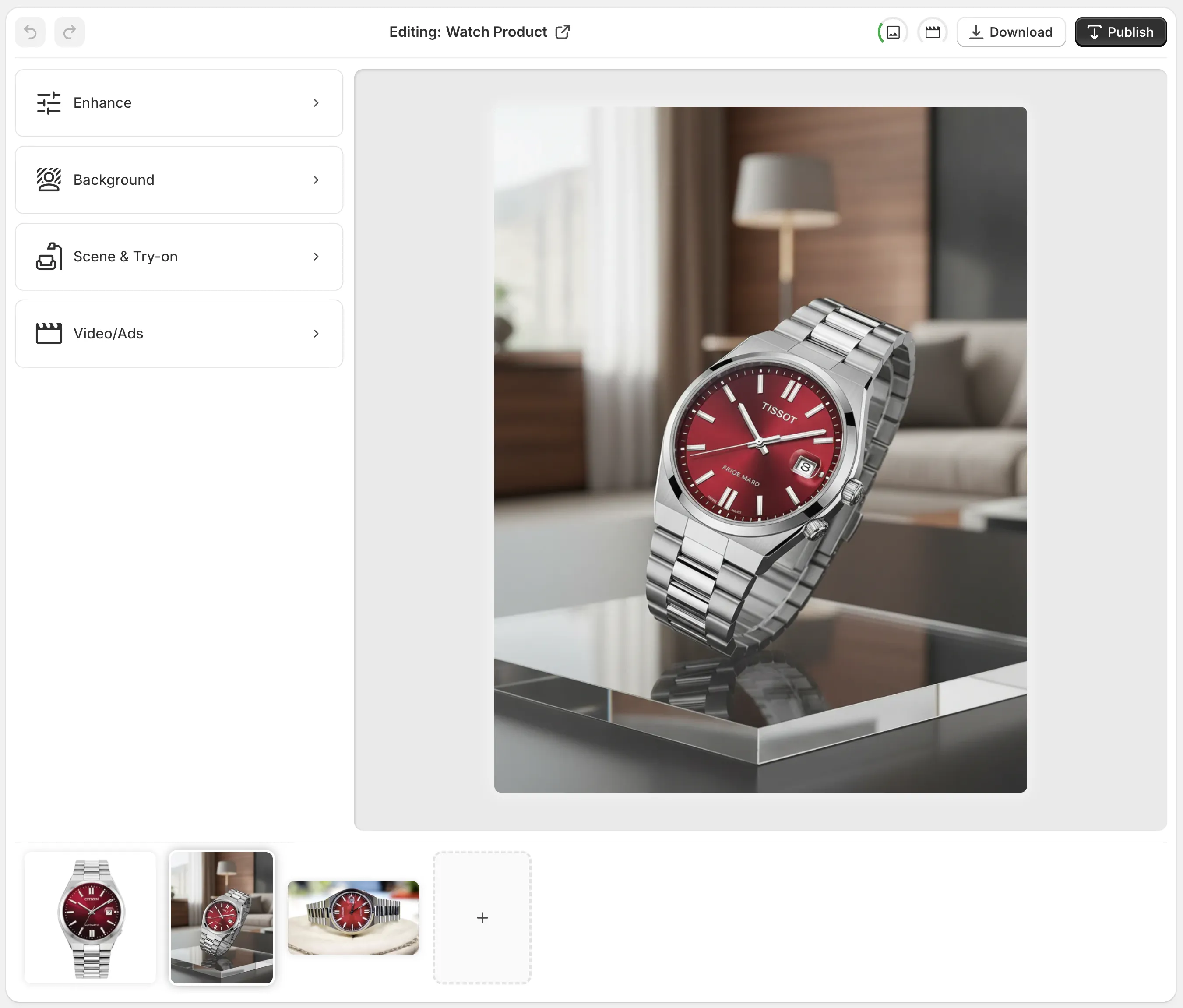
3) Build the lifestyle scene with Object Placement
- Choose an environment: studio, kitchen, bathroom vanity, office desk, outdoor patio, boutique shelf.
- Set surface type, camera angle, and lighting style to match your brand mood.
- Add realistic shadows and reflections to anchor the product and avoid the cut-out look.

Pro tips for composition and realism:
- Keep the hero product dominant; use the rule of thirds for a natural focal point.
- Add subtle, on-brand props that imply use but do not distract.
- Match color temperature between product and scene; warm product shots fit best in warm scenes.
- Maintain believable contact shadows; floaty objects hurt trust.
4) Fashion stores: Generate on-model images with AI try-on
- Pick or create a model that aligns with your audience — adjust pose, skin tone, and body type.
- Ensure product fidelity: seam lines, fabric texture, and print placement should match your real item.
- Create multiple looks: studio backdrop for PDP hero, lifestyle scene for secondary images, and a social-ready square crop for ads.

5) Generate variations and test quickly
- Export 3–5 scene variations with small changes in angle, light, or prop layout.
- Use one as your main image, and the rest as alternates for A/B testing in ads or PDP.
- Save style presets to keep brand consistency across your entire catalog.
6) Publish to Shopify in one click
- Replace or add the new images to your product gallery.
- Keep consistent sequencing: hero lifestyle shot first, then angles, then detail macro, and finally any packaging shot.
- Reuse the best frame as your collection thumbnail and in homepage modules for visual cohesion.
Bonus: Add motion with UGC and b-roll
Static photos get the click; short videos seal the decision. Use the app’s UGC-style and b-roll generators to create:
- Short tabletop reveals with soft spotlight and dust/smoke splash effects
- Quick POV demonstrations that show scale and usage
- Vertical social cuts with voiceover options for Reels and TikTok
Watch a quick overview here: https://www.youtube.com/watch?v=M2ISy20la78
SEO and performance checklist for product images
- Descriptive alt text: Include primary keywords naturally, e.g., 'matte black ceramic mug on kitchen counter.'
- File naming: Use hyphenated, keyword-rich names, not IMG_1234.
- Consistent aspect ratios: 1:1 or 4:5 for mobile-first grids; keep it uniform across the catalog.
- Web-ready sizes: Serve large images for zoom, but compress to keep pages fast.
- Structured content: Pair lifestyle heroes with short benefit bullets so search engines understand context.
- Accessibility: Maintain sufficient contrast and avoid text baked into images.
Common pitfalls (and easy fixes)
- Mismatched lighting and shadows: If the scene is warm sunset, the product can’t be lit with cool midday light.
- Overly busy props: Keep the stage minimal; one or two props are enough to imply context.
- Cropping too tight: Leave breathing room and negative space for responsive layouts and overlays.
- Color drift: Use the app’s auto color correction to keep brand colors consistent across SKUs.
What makes Supra AI Photo Studio different
- Built for ecommerce: Tools map directly to PDP, collection, and ad use cases.
- Accuracy-first try-on: Maintains product details like seams, prints, and textures.
- Lifestyle object placement that looks real: Perspective, shadows, and reflections handled in one flow.
- Images and videos are yours: Full rights for store and marketing.
- Start free, then scale with generous quotas as you grow.
Explore features and pricing on the landing page or install directly from the Shopify App Store listing.
Ready to create high-converting Shopify product photos?
You do not need a studio, models, or a production crew. With the right AI workflow, you can produce on-brand lifestyle backgrounds, on-model images, and scroll-stopping short videos in minutes — and update your entire catalog without breaking momentum.
- Try it free: Install Supra AI Photo Studio
- Learn more and see examples: Visit the live landing page
Turn your plain cut-outs into lifestyle stories that sell — and watch your conversion rate follow.
Comments
Post a Comment