Looking to reduce hosting costs, speed up your site, or gain full control over deployment? Converting your site from Squarespace to static HTML is a smart move. In this guide, you’ll learn the safest, fastest way to download your Squarespace site as HTML, CSS, JS, and images—and self-host it—using ExFlow, a powerful Squarespace Exporter and Squarespace Downloader.
Why export your Squarespace site?
- Cost savings: Avoid paying for features you don’t need if you just want a fast, reliable static site.
- Performance: Static HTML typically loads faster and is more cache-friendly.
- Control: Choose your own hosting stack, CDN, or deployment workflow.
- Portability: Keep offline backups or move seamlessly to providers like S3, GitHub Pages, Netlify, or traditional FTP hosting.

What you’ll get when you export to HTML
- Static pages (.html) for all accessible URLs
- Linked CSS and JS
- Images and media assets
- Optional custom script.js and style.css to extend or override styling/behavior
Important limitations of static exports
- Dynamic features that rely on Squarespace’s backend (native forms, comments, built-in search, member areas, store checkout) won’t function out of the box. You can replace many with third-party services.
- CMS editing inside Squarespace won’t affect your static copy after export—you’ll re-export when you make changes.
Step-by-step: Download your Squarespace site to HTML with ExFlow ExFlow is a dedicated exporter that can download Squarespace to HTML quickly and reliably. It supports exporting all pages and assets, and it offers automatic syncing to S3, Git, and FTP, plus optional hosting.
1) Open ExFlow
- Visit https://exflow.site
- ExFlow is designed as a Squarespace Exporter and Squarespace Downloader: simply enter your site’s URL.
2) Enter your site URL (and password, if required)
- Paste the public domain or staging URL of your Squarespace site.
- If your site is password-protected and you are the owner, ExFlow can access it when you provide the password.
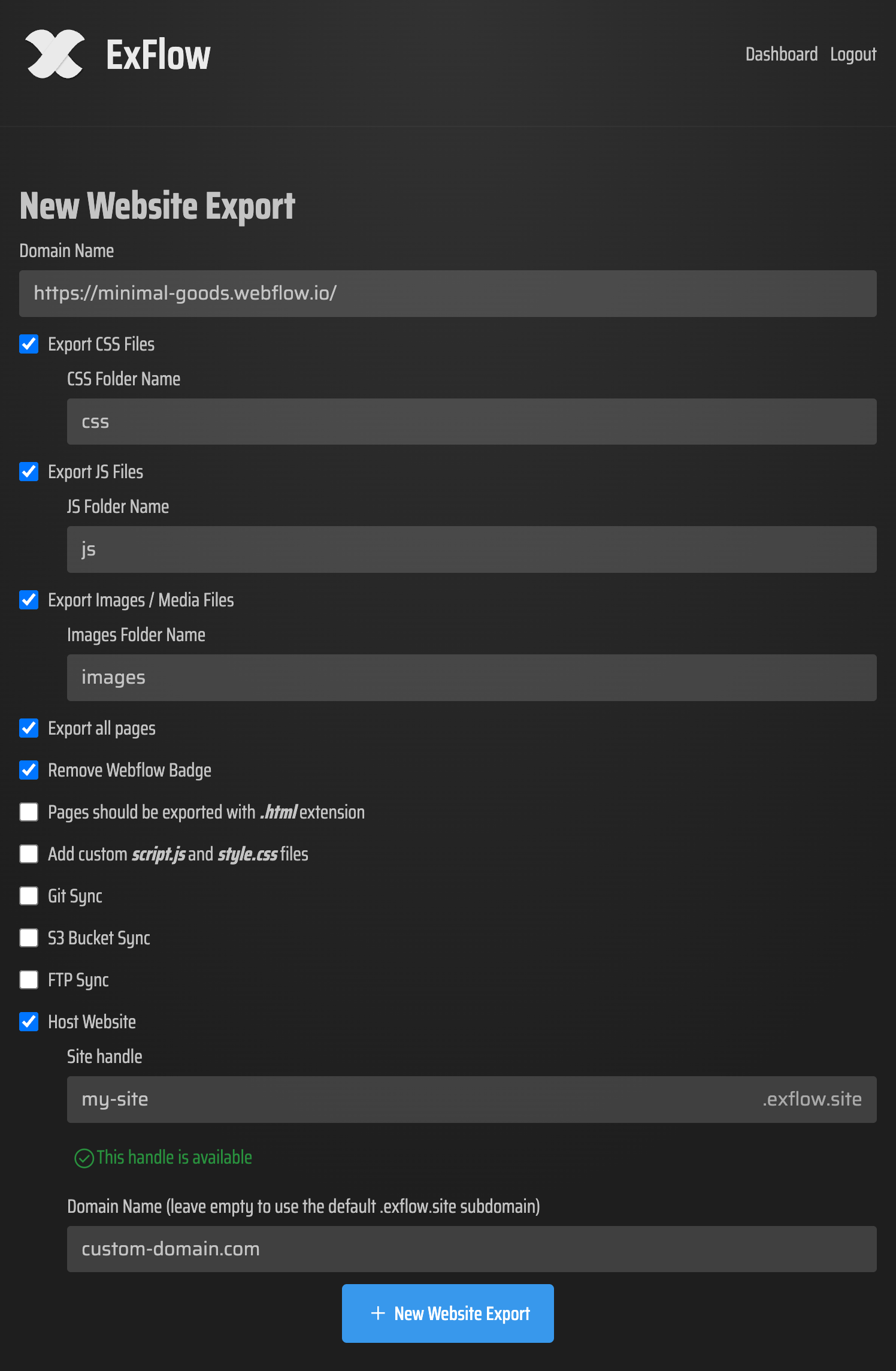
3) Choose your export settings
- Export CSS Files
- Export JS Files
- Export Images / Media Files
- Export All Pages
- Pages exported with .html extension
- Add custom script.js and style.css files
- Sync Git, Sync S3, Sync FTP (optional)
- Hosting (optional) with unlimited bandwidth and custom domain support
- Note: ExFlow also offers “Remove Webflow Badge” for Webflow projects; not relevant to Squarespace but useful if you export those too.
4) Run the export
- ExFlow will crawl your site, download pages and assets, and package everything into a clean static bundle.
- When finished, download the ZIP or let ExFlow auto-sync it to your destination (S3, Git, FTP) or host it directly on ExFlow.
5) Host your exported site You have multiple options after you Download Squarespace Site assets:
Option A — Host on ExFlow (fastest)
- During export, choose Hosting.
- ExFlow deploys your static bundle on their infrastructure with unlimited bandwidth.
- Connect your custom domain for a professional setup.
Option B — Amazon S3 (budget-friendly)
- Create an S3 bucket and enable static site hosting.
- Use ExFlow’s S3 Sync to push files automatically.
- Point your domain (via Route 53 or your registrar) and add CloudFront for global caching.
Option C — Git + Static Hosts
- Connect your Git repo (GitHub/GitLab/Bitbucket) and let ExFlow push updates.
- Deploy via GitHub Pages, Netlify, or Vercel for CDN-level performance.
Option D — FTP to any server
- Provide FTP credentials in ExFlow to upload your bundle automatically.
- Ensure your web root serves index.html and assets correctly.
Upgrade your static site: what to replace from Squarespace
- Forms: Use Formspree, Getform, Basin, or Netlify Forms. Add the new endpoint to your exported forms.
- Search: Consider a client-side solution like an index.json with Lunr.js or fuse.js for lightweight search.
- Comments: Use third-party embeds like Disqus, GraphComment, or a privacy-first alternative.
- E-commerce: Static exports won’t replicate Squarespace checkout. Consider an external cart (Lemon Squeezy, Gumroad) or a Jamstack approach.
SEO and migration checklist for Squarespace to HTML
- Preserve URLs: Keep the same slugs where possible.
- 301 redirects: If any URLs change, set 301s at your host/CDN.
- Canonicals: Ensure each page has a canonical link tag pointing to itself.
- Robots.txt and sitemap.xml: Generate new versions and host them at the site root.
- Metadata: Verify titles, meta descriptions, Open Graph, and Twitter Card tags are intact.
- Analytics: Reinstall your analytics snippet (GA4, Plausible, etc.) in your script.js or HTML head.
- Performance: Enable CDN caching, set long cache-control for assets, compress images, and lazy-load noncritical media.
- Accessibility: Confirm headings, alt text, and color contrast remain correct after export.
- 404 and 301 pages: Include a clean 404.html and verify redirects work at the CDN/host level.
Is self-hosting worth it? If “Squarespace too expensive” is on your mind or you want complete control, self-hosting a static copy often yields significant savings and speed gains. With ExFlow handling the heavy lifting—Squarespace to HTML export, asset collection, and automated deployment—you get the benefits without complex tooling.
Why choose ExFlow for Squarespace to HTML?
- Simplicity: Enter your URL, pick options, and export.
- Completeness: Export pages, CSS, JS, and media.
- Automation: Sync directly to Git, S3, or FTP; or one-click Hosting on ExFlow.
- Scalability: Plans with higher limits for bigger sites and more frequent exports.
- Control: Add a custom script.js and style.css to extend your static site.
Learn more and get started
- Start exporting now: https://exflow.site
- ExFlow Hosting with custom domains and unlimited bandwidth: https://exflow.site
- Feature updates and limits vary by plan; pick what fits your workflow.
Watch a quick demo (concepts apply to Squarespace exports too):
- How to Export CMS Pages on Webflow for FREE: https://www.youtube.com/watch?v=USu9ktYjFDU
- Export a Webflow Site for Free + Badge Removal: https://www.youtube.com/watch?v=38hVzKheSvs
Responsible use and legal note Only export websites you own or have explicit permission to export. Respect all platform terms, copyrights, and third-party license requirements. If you handle credentials (Git, S3, FTP), store and share them securely.
Final takeaway If you need a reliable Squarespace Exporter to Download Squarespace Site content into clean, portable HTML for self-hosting, ExFlow is the fastest path. Export all pages and assets, then deploy to your favorite host—or let ExFlow host it with unlimited bandwidth and a custom domain. Take control of your site today at https://exflow.site
Comments
Post a Comment