If you sell on Etsy and want more eyes—and buyers—on your products, connecting your Etsy listings to Instagram Shopping is one of the highest-ROI moves you can make. With shoppable tags, your audience can go from discovering your product in a Reel or post to landing on the exact listing in seconds. Below is a concise, step-by-step guide to link your Etsy shop to Instagram and Facebook Shops using a live data feed, so your catalog stays in sync automatically.

What you’ll achieve
- Connect Etsy to Instagram Shopping and Facebook Shop without manual uploads
- Enable product tagging in Instagram posts, Stories, and Reels
- Keep your Etsy listings synced automatically with a live data feed
- Reduce errors, save time, and increase conversions
Pro tip: Use the Catalog Generator for Etsy to create a compliant, auto-updating feed for Commerce Manager. It’s just $5/month after a 7-day free trial and takes minutes to set up. Start here: https://catalog-generator.webyze.com/
Prerequisites (quick checklist)
Before you start, make sure you have:
- A Facebook Business account with an associated Facebook Page
- An Instagram Professional (Business) account linked to your Facebook Page
- Access to Commerce Manager (within Meta Business tools)
- Your Etsy shop URL and permission to edit settings in your Etsy Shop Manager
- A product catalog feed URL (you’ll generate this via Catalog Generator)
Step-by-step: Connect Etsy to Instagram Shopping
1) Create or access your Business account and link profiles
- Go to https://business.facebook.com/ and create/log in to your Business account.
- In Business Settings, link your Facebook Page and your Instagram account to the same Business.
- Ensure your Instagram account is switched to Professional (Business). It’s free and unlocks insights and product tagging.
2) Verify your Etsy shop domain in Business Settings
Meta requires domain verification to allow product tagging and external checkout.
- In Business Settings, navigate to Brand Safety & Suitability > Domains.
- Click Add, then enter your Etsy shop’s domain in the format: yourshopname.etsy.com
- Tip: Grab your shop name from the URL of your Etsy shop. Visiting yourshopname.etsy.com should redirect to your shop.
- Choose the Meta-tag verification method and copy the provided meta tag.
- In Etsy Shop Manager, go to Settings > Facebook Shops (or a similarly named section for meta tag/domain verification) and paste the meta tag.
- Return to Business Settings > Domains and click Verify. Your domain status should switch to Verified.
3) Create a catalog in Commerce Manager
- From Business tools, open Commerce Manager.
- If you don’t have a catalog yet, create one (choose the option for ecommerce products).
- Open your catalog and go to Data Sources.
4) Generate your Etsy data feed URL with Catalog Generator
Stop worrying about spreadsheets. A live feed keeps your listings updated automatically.
- Visit https://catalog-generator.webyze.com/
- Sign up or log in, then connect your Etsy shop.
- Copy the feed URL provided by the app. This URL is what Commerce Manager uses to import and sync your listings.
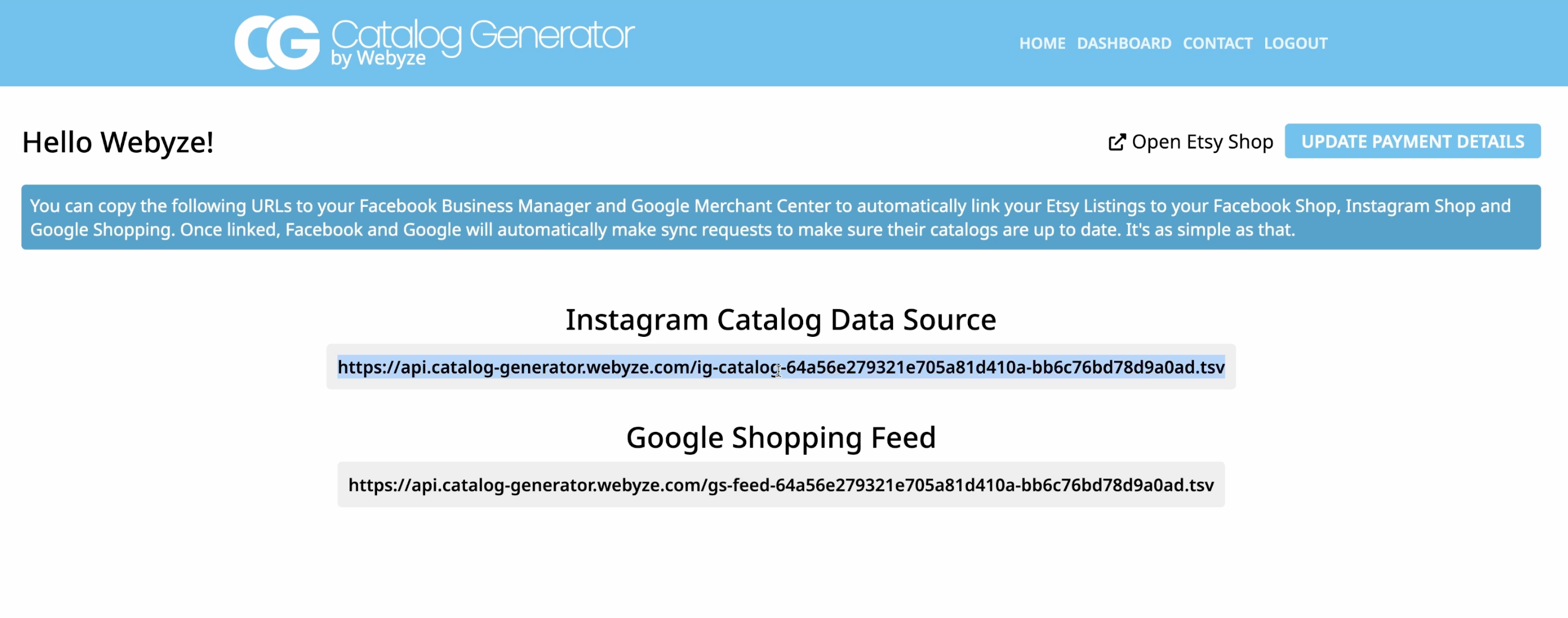
Why this matters: Any changes you make on Etsy—new listings, price updates, inventory changes—will be reflected automatically in your Facebook and Instagram Shops, without manual uploads.
5) Add the data feed to your catalog (via URL)
- In Commerce Manager > Catalog > Data Sources, click Add Items.
- Choose Data Feed > Use a URL (so it stays synced, no manual files).
- Paste the feed URL you copied from Catalog Generator.
- Set a fetch schedule (daily is a great default) so updates are pulled automatically.
- Review settings and click Save Feed & Upload to start the first import.
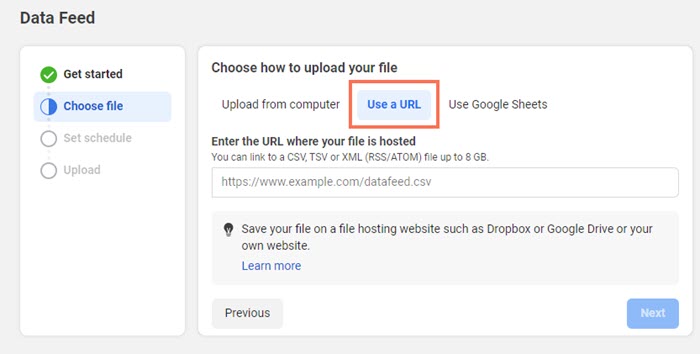
The first sync can take several minutes depending on catalog size. When complete, check your Items tab to confirm your Etsy products are present.
6) Submit your domain for approval in your catalog
- In your catalog’s Settings, submit your verified domain (yourshopname.etsy.com) for review.
- Once approved, you can enable product tagging that directs shoppers to your Etsy listings.
7) Turn on Instagram Shopping and start tagging
- In the Instagram app, go to Settings > Creator/Business > Set up a Shop (or Shopping) and connect the catalog you just created.
- After approval, tag products in posts, Reels, and Stories. Shoppers can tap the tag and be redirected straight to your Etsy listing.
Watch the full walkthrough
Prefer a visual guide? This step-by-step video shows the entire flow, including domain verification and feed setup: https://www.youtube.com/watch?v=2ChLE92Cu4s
Why use Catalog Generator for Etsy
- True automation: Your catalog stays synced—no spreadsheets, no manual uploads
- Faster go-live: Guided setup with clear instructions and support
- Affordable: Only $5/month with a 100% 7-day free trial, cancel anytime
- Future-proof: Set it once, and new/updated listings flow to Instagram and Facebook automatically
Get started now: https://catalog-generator.webyze.com/
Troubleshooting tips
- Domain won’t verify: Double-check the domain format (yourshopname.etsy.com), ensure the meta tag is placed in Etsy via Shop Manager > Settings > Facebook Shops, then click Verify again.
- Products not appearing: Revisit Commerce Manager > Data Sources to confirm the feed URL is correct and the latest fetch succeeded. You can trigger a manual fetch.
- Item rejections: Ensure product titles, descriptions, and images comply with commerce policies; avoid prohibited items and ensure clear pricing.
- Currency or pricing issues: Confirm your Etsy shop currency and shipping profiles are correctly set; let the next scheduled fetch update your catalog.
- Multiple catalogs: Make sure Instagram Shopping is connected to the catalog synced from your Etsy feed.
SEO-friendly best practices for higher conversions
- Use clear, keyword-rich product titles and alt-friendly images on Etsy (e.g., “Gold Minimalist Hoop Earrings – Hypoallergenic, Gift for Her”).
- Showcase lifestyle photos in Instagram posts and Reels, then tag matching products from your catalog.
- Keep your most profitable and seasonal items featured in Stories Highlights with product tags for quick discovery.
- Update your Etsy inventory and pricing regularly—Catalog Generator will push updates through automatically.
Your next step
You’re minutes away from shoppable posts that send customers straight to your Etsy listings. Automate your catalog, remove manual work, and unlock product tagging across Instagram and Facebook.
Start your free 7-day trial now: https://catalog-generator.webyze.com/
Pricing: $5/month, billed monthly. Cancel anytime. Need help? Reach out via the site—we’re here to help.
Comments
Post a Comment