If you’ve ever wished you could download your entire Squarespace site as clean, portable HTML to host anywhere, you’re not alone. Between rising hosting costs, platform lock-in, and limited control over server features, many creators are looking for a Squarespace Alternative that keeps the design they love—without the recurring bill. The fastest path? Use a reliable Squarespace Downloader to export your site to HTML, CSS, JS, and images, then host it wherever you want.
In this guide, you’ll learn how to convert Squarespace to HTML with ExFlow, what to expect when going static, and how to self-host your exported site with confidence.

What is a Squarespace Downloader (and why use one)?
A Squarespace Downloader is a tool that crawls your public pages and exports them as a static site—HTML files with linked CSS, JS, and media. You keep your brand and layout while unlocking:
- Cost control: If Squarespace feels too expensive for your use case, export once and host for pennies.
- Portability: Move providers freely; no vendor lock-in.
- Performance: Static HTML can load blazingly fast when served over a CDN.
- Control: Add your own scripts, integrate with developer workflows (Git, CI/CD), and customize beyond platform limits.
Traditional site downloaders like HTTrack struggle with modern, script-heavy builders (animations break, dynamic content vanishes). ExFlow is built specifically to export Webflow, Framer, and Squarespace sites as static bundles that preserve styling, assets, and interactivity better than generic scrapers.
Meet ExFlow: A purpose-built Squarespace Exporter
ExFlow is a fast, user-friendly Squarespace Downloader that lets you Download a Squarespace Site by simply entering its URL. It supports:
- Exporting HTML, CSS, JavaScript, and all images/media
- Exporting all pages with .html extensions
- Removing “Made with” badges
- Adding custom script.js and style.css
- Optional Hosting on ExFlow with custom domains and unlimited bandwidth
- Automatic sync to Git, S3, and FTP (enter credentials to push directly)
It’s also a versatile tool that works with Webflow and Framer. But in this article, we’ll focus on using ExFlow as a Squarespace to HTML solution.
Step-by-step: Export Squarespace to HTML with ExFlow
Follow this workflow to Download your Squarespace Site and prepare it for self‑hosting:
1) Open ExFlow.site
- Go to https://exflow.site and paste your Squarespace URL.
- If your Squarespace is password-protected, ExFlow can access it when you provide the password (as the site owner).
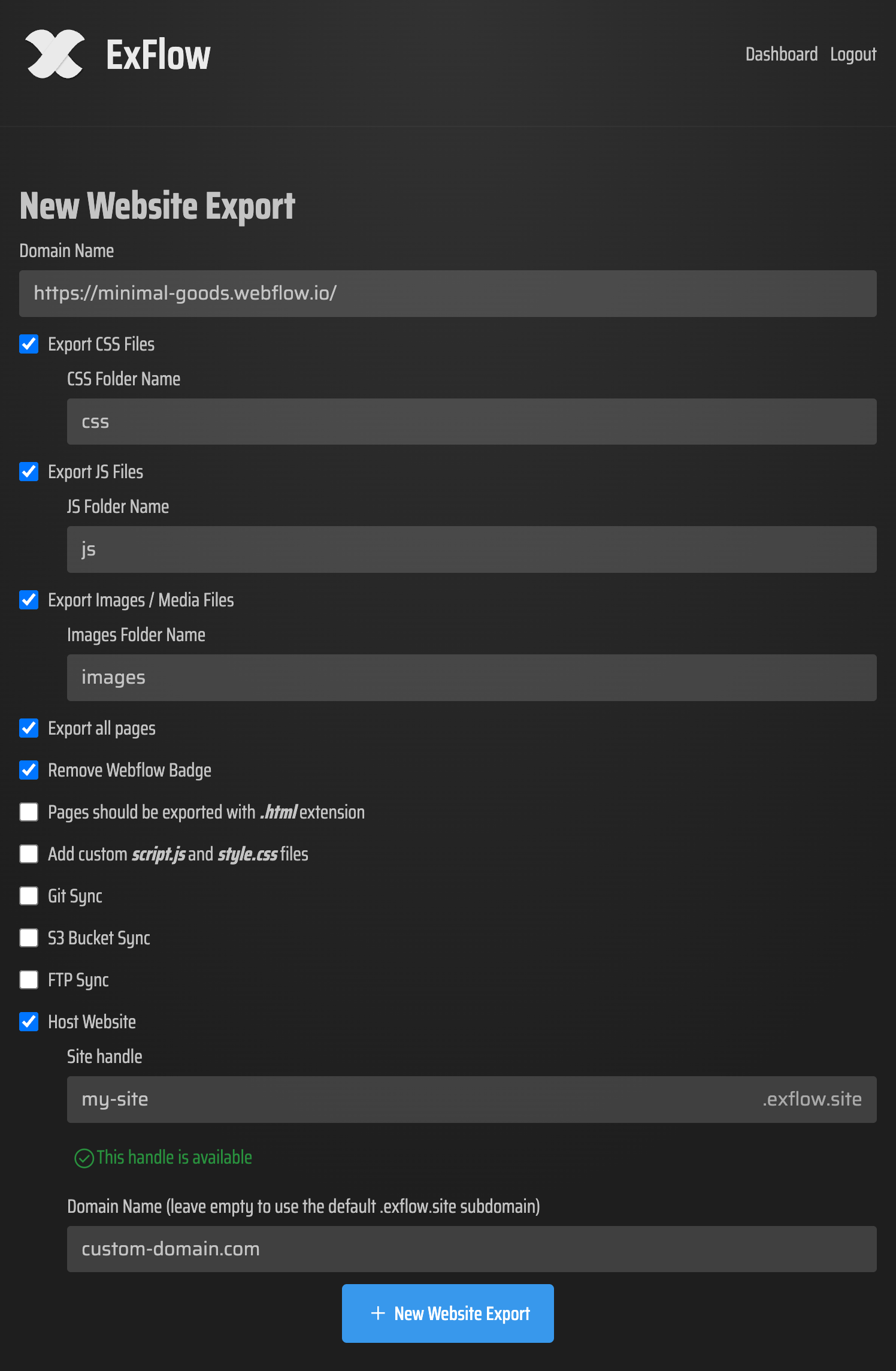
2) Choose export settings
- Export CSS files, JS files, images, and media assets
- Export all pages (recommended for complete coverage)
- Remove the “Made with” badge (cleaner presentation)
- Ensure pages export with .html extensions
- Optionally add custom script.js and style.css to extend or tweak behavior
3) Decide where your files go
- Download a ZIP of the exported site
- Or enable automatic sync: Git (for version control), S3 (for static hosting), or FTP (for traditional servers). You’ll need to provide the necessary credentials; handle these securely.
4) Export and verify
- Run the export and review the output locally.
- Open index.html and click through links, images, and forms to confirm everything works.
5) Host your site
- Choose your preferred hosting option (see below) and publish.
Hosting options after export
You have several solid options once you’ve converted Squarespace to HTML:
- Host on ExFlow
- The simplest path. ExFlow can host your static site with unlimited bandwidth and let you connect a custom domain. Ideal if you want speed and zero DevOps.
- Amazon S3 + CDN
- Use ExFlow’s S3 sync, enable static website hosting on your bucket, and front it with CloudFront for global speed.
- Git-based hosting
- Sync to Git and deploy via GitHub Pages, Netlify, or Vercel. Great for teams that want version control and CI/CD.
- Traditional server over FTP
- Point ExFlow to your FTP credentials and publish to your existing hosting account.
What changes when you go static (and how to handle it)
Squarespace is a dynamic platform. When you export to static HTML, you’ll preserve your visual design and most front-end interactions—but some server-dependent features won’t carry over directly. Plan for these swaps:
- Forms and submissions: Replace Squarespace forms with services like Formspree, Getform, Basin, or Netlify Forms (if using Netlify).
- Site search: Use a client-side search library like Pagefind or Lunr.js.
- Comments: Consider a third-party solution such as Disqus or Hyvor Talk.
- Member areas and shopping carts: Static exports won’t replicate authenticated flows or real-time carts. If you need ecommerce, integrate a headless checkout (e.g., Snipcart) or move to a platform designed for static stores.
- Scheduling and dynamic widgets: Use embeds or API-driven JS where possible.
Pro tip: Keep a “source of truth” copy of your content so you can re-export with ExFlow whenever you update the design or publish new pages in Squarespace.
SEO and performance checklist after export
A well-configured static site can perform brilliantly in search. Before launching, tick off these basics:
- Verify titles, meta descriptions, and canonical tags were preserved in the HTML
- Generate and submit a sitemap.xml (many static hosts and tools can help)
- Set up 301 redirects for any URL changes
- Add robots.txt as needed
- Connect analytics (e.g., GA4) and error monitoring
- Serve images in modern formats where possible and enable HTTP/2 + compression via your host/CDN
- Test Core Web Vitals with PageSpeed Insights and Lighthouse
Why ExFlow over generic downloaders?
HTTrack and similar tools can mishandle complex builders, breaking animations, interactivity, and dynamic content. ExFlow’s Squarespace Exporter is engineered to capture modern front-end structures accurately and provides pro-grade extras:
- All-pages export with clean .html files
- Asset consolidation and optional custom scripts/styles
- Built-in Hosting and one-click sync to Git, S3, FTP
- Ability to access password-protected Squarespace sites when the owner provides the password
Frequently asked questions
- Is this allowed? Always review Squarespace’s Terms of Service and ensure you have the rights to export the content. ExFlow simply helps you create a static snapshot of pages you own.
- Will my blog posts and galleries export? If they are publicly visible, they’ll export as rendered HTML. Private/member-only content will not function as-is in a static context.
- Does this help with “Squarespace too expensive”? For many sites, yes. Export once, then host for a fraction of the cost. You’ll trade built-in dynamic features for control and savings.
- Can I update later? Yes. Make changes in Squarespace, then re-run the export in ExFlow and redeploy.
Quick start recap
- Use a Squarespace Downloader to convert Squarespace to HTML
- Choose ExFlow for a reliable, modern export that preserves design
- Host on ExFlow or sync to Git/S3/FTP
- Replace server-dependent features with lightweight SaaS or scripts
- Launch a fast, portable, self-hosted site
Ready to Download your Squarespace Site and self-host with confidence? Start your first export now with the ExFlow Squarespace Exporter and take full control of your website’s speed, costs, and future.
Comments
Post a Comment